It is impossible to adjust TS correctly: there is only one digit visible in a setup dialog!
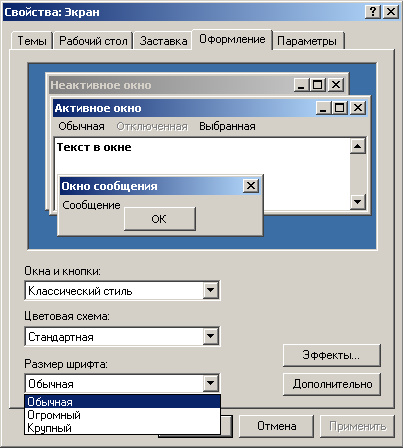
It is because of screen fonts enlarging: the last TS digit was placed outside of input box visible area. It is necessary to adjust OS for standard system fonts sizes. For Windows 2000 and XP:- Check desktop theme": make right-clik inside clean desktop area, choose
Properties,Оформлениеtab: font size must be *Обычная:
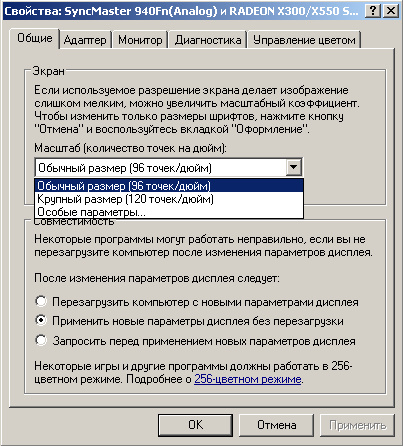
- Check display prperties: make right-clik inside clean desktop area, choose
Properties,Параметрыtab, thenДополнительноbutton and adapter options dialog will be opened. CheckОбщиеtab:Масштабmust be set to96 точек на дюймvalue:
For Windows Vista:
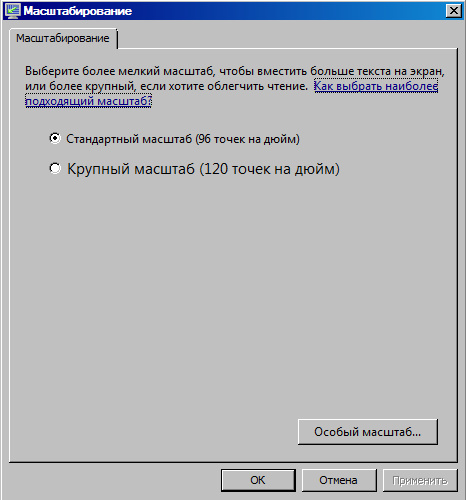
- Check Ease of Access Centre: make right-clik inside clean desktop area, choose
Персонализация...(or throughControl Panel), thenНастройка изображения на экране, thenИзменить размер текста и значков. ChooseСтандартный масштаб (96 точек на дюйм)in theМасштабированиеdialog.
 Keywords:
TS, Timeslot, ВИ, ВК, временной интервал, временной канал
Keywords:
TS, Timeslot, ВИ, ВК, временной интервал, временной канал| EditorForm | |
|---|---|
| ArticleStatus? | Correcting |
| TranslationStatus? | Editing |
| Comment | |
This topic: Public > WebHome > FrequentlyAskedQuestions > CommonQuestionLargeFonts
Topic revision: r4 - 2008-01-16 - 13:46:40 - OxanaAkhremenko
© ООО "НТЦ Севентест". 2007. Перепечатка и копирование материалов без письменного разрешения правообладателя запрещены.
Есть идеи, вопросы или проблемы, связанные с TWiki? Свяжитесь с нами.
Есть идеи, вопросы или проблемы, связанные с TWiki? Свяжитесь с нами.